Introducing Avatars: See the People You'll Be Sharing Passwords With

Table of Contents
We here at TeamPassword know how important security is to you. If it wasn't, you wouldn't be bothering to search for the best enterprise password manager. But you are, and that's why we're excited to announce our newest feature: Avatars!
The use of avatars within our product allows for you to see, at a glance, who your accounts are being shared with and who on your team has access to what. This feature makes everything a little quicker, a little easier, and a heck of a lot more convenient.
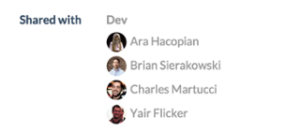
We have always fancied ourselves as a people-centric company. We care that our product fits the way you and your team operate. We know that who you are drives what you do; we want to make your experience with us feel organic and human. The use of avatars keeps your accounts feeling people focused. Every time you see the tiny, smiling face of one of your teammates staring right back at you, you'll know that all of your sensitive information is in the right hands.
So, now that we're all extremely amped up on this new feature, tell us, will you be keeping the same old avatar from the days of yore or do you think it's time for a little update? Perhaps throw it back a little so we can see what your hair looked like in high school. No matter what you choose, you can always change your avatar with us using Gravatar.
Follow @TeamPassword on Twitter for more fun stuff and keep up to date on new tips and features at TeamPassword.com/blog
Convinced? give TeamPassword a whirl.
The use of avatars within our product allows for you to see, at a glance, who your accounts are being shared with and who on your team has access to what. This feature makes everything a little quicker, a little easier, and a heck of a lot more convenient.
Look at all these little faces, ready to share some passwords and get to work
We have always fancied ourselves as a people-centric company. We care that our product fits the way you and your team operate. We know that who you are drives what you do; we want to make your experience with us feel organic and human. The use of avatars keeps your accounts feeling people focused. Every time you see the tiny, smiling face of one of your teammates staring right back at you, you'll know that all of your sensitive information is in the right hands.
So, now that we're all extremely amped up on this new feature, tell us, will you be keeping the same old avatar from the days of yore or do you think it's time for a little update? Perhaps throw it back a little so we can see what your hair looked like in high school. No matter what you choose, you can always change your avatar with us using Gravatar.
Follow @TeamPassword on Twitter for more fun stuff and keep up to date on new tips and features at TeamPassword.com/blog
Convinced? give TeamPassword a whirl.
Enhance your password security
The best software to generate and have your passwords managed correctly.